
Have you ever had this experience: you buy a USB-C charger labeled “100W fast charging”, but it still charges your phone slowly, or even doesn’t work at all when plugged into your laptop’s USB-C port? Many people mix up concepts like USB-C interface, PD fast charging, and high-speed data, ending up wasting money without getting the expected experience. In fact, the core of all this is the USB PD fast charging protocol — it is not a hardware interface, but a set of universal rules for devices of different brands to negotiate charging power safely.
First, Understand the Basics: What Exactly is PD?
Vernacular Definition and Basic Attributes
The full name of PD is USB Power Delivery, in plain terms it is the universal charging power negotiation rule for USB-C ports. It is not an interface form, but a set of power supply specifications including communication negotiation, power electrical requirements, and cable identification requirements. It is developed and released by USB-IF (USB Implementers Forum, an industry organization composed of global technology companies), and is an industry technical standard, not a mandatory law — manufacturers can choose to use it or not, but as long as they claim to support PD, they must comply with the specification.
In terms of versions, the earliest PD 1.0 has been completely eliminated, with no consumer-grade products in use; common devices on the market mainly use PD 2.0, PD 3.0, and PD 3.1; USB-IF has also released PD 3.2, and the specific support capabilities shall be subject to the device and the latest USB-IF specifications.
Easily Confused Concept Boundaries
Many people fall into pitfalls because they mix different categories of concepts together. We can sort them out into three categories:
Hardware Interface Category
- USB-C: What we often call Type-C, is a hardware interface form that can be plugged in either way. But having a USB-C port does not mean it supports PD fast charging — just like having a water pipe does not mean there is high-pressure water; the pipe is just the channel, and whether there is pressure depends on the water supply system.
- USB-A: The old rectangular USB interface that has been used for decades. Traditional USB-A ports cannot implement standard USB PD negotiation in the USB-C way; they may still support non-PD charging solutions such as BC 1.2 or QC, depending on the device implementation.
Power Supply Protocol Category
- BC1.2: A very early USB charging specification, with a maximum of only 5V/1.5A (7.5W), which can only meet slow charging needs.
- PPS: An optional function of PD 3.0, full name Programmable Power Supply, which can adjust the voltage in small increments, making direct charging of mobile phones more efficient and with less heat generation.
- SPR/EPR: Two power ranges in PD 3.1, SPR is Standard Power Range (up to 100W), EPR is Extended Power Range (up to 240W).
Other Function Categories
USB-C ports can carry functions such as charging, data transmission, and video output at the same time, but these functions are independent of each other. Supporting PD fast charging does not mean supporting high-speed data, USB4, or Thunderbolt — many devices’ USB-C ports only support charging and basic data, cannot even output 4K video, let alone Thunderbolt.
Applicable Scenarios and Core Misconceptions
PD is mainly used for consumer electronics that implement USB-C power supply functions and are designed to support USB PD, such as mobile phones, tablets, laptops, power banks, docking stations, monitors, etc.; whether it is supported shall be subject to the specific port and product specifications. Private fast charging on old USB-A ports and dedicated power supplies with non-USB interfaces (such as the round charging port of laptops) are not within the scope of standard USB PD negotiation.
Here we first correct three of the most common cognitive misconceptions to avoid going astray at the beginning:
- Having a USB-C port means supporting PD fast charging: Wrong. Some USB-C ports are only used for data or video transmission and have no charging function.
- Labeled “fast charging” equals supporting PD: Wrong. Many brands’ private fast charging is also called “fast charging”, but it is not the same set of standards as PD.
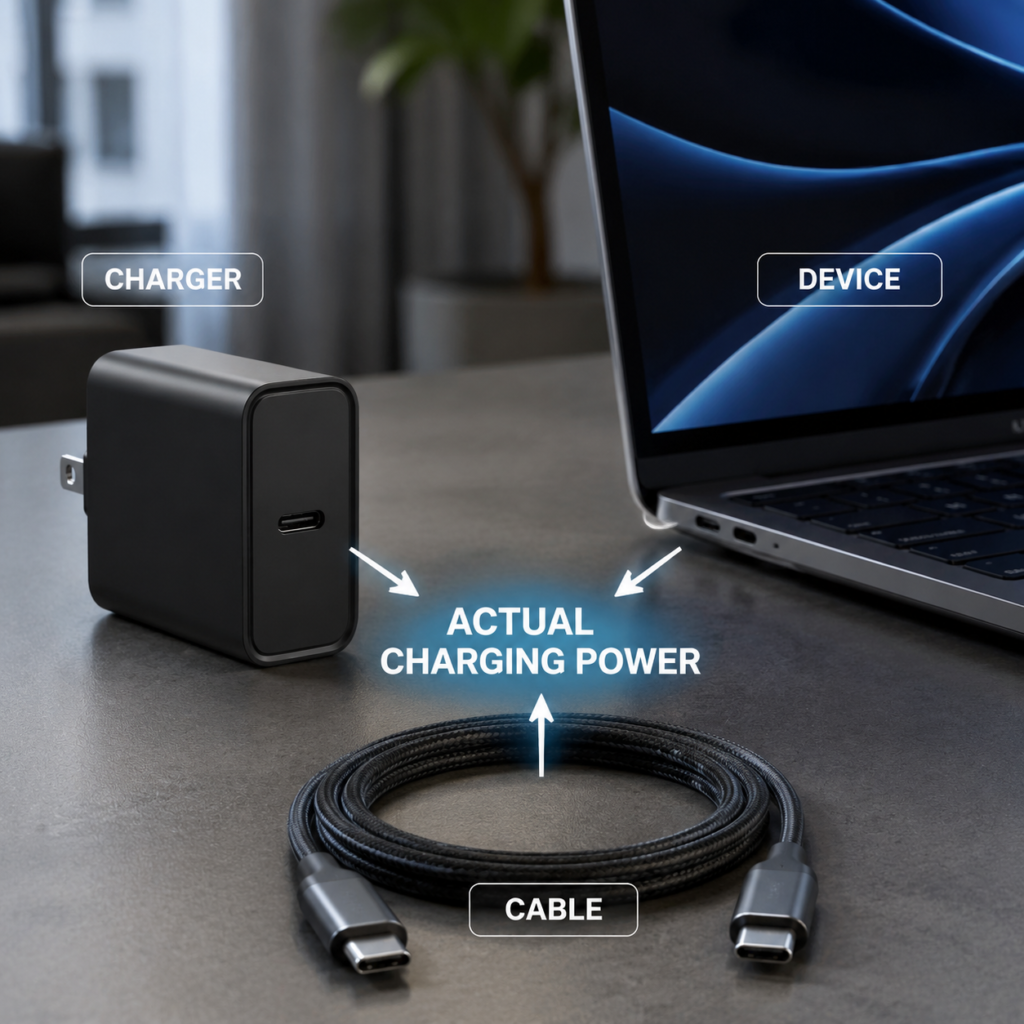
- PD chargers can reach the labeled maximum power: Wrong. The maximum power of the charger is its upper limit, and the actual power depends on whether the cable and the device support it.
How PD Fast Charging Works
The core of PD fast charging is “negotiation” — it is not the charger forcing power, but the two sides discussing it, which is both fast and safe.
Four Participating Roles
A complete PD charging requires the cooperation of four roles:
- Power Supply End (technical name: Source): Devices that output power, such as chargers and power banks.
- Power Receiving End (technical name: Sink): Devices that need to be charged, such as mobile phones and laptops.
- Dual-Role Port (technical name: DRP): Can act as both a power receiving end for charging and a power supply end for external power supply, such as the USB-C port of some laptops (charging when plugged into a charger, supplying power to a mobile phone when plugged into a mobile phone), and the USB-C port of a docking station.
- Transmission Channel: USB-C charging cable, which not only transmits power but also transmits the negotiation signals of both parties, so the specification of the cable directly affects whether fast charging can be triggered.
Full Process of Negotiated Charging
The whole process is actually very similar to ordering food at a restaurant, it is fully automated and does not require user operation:
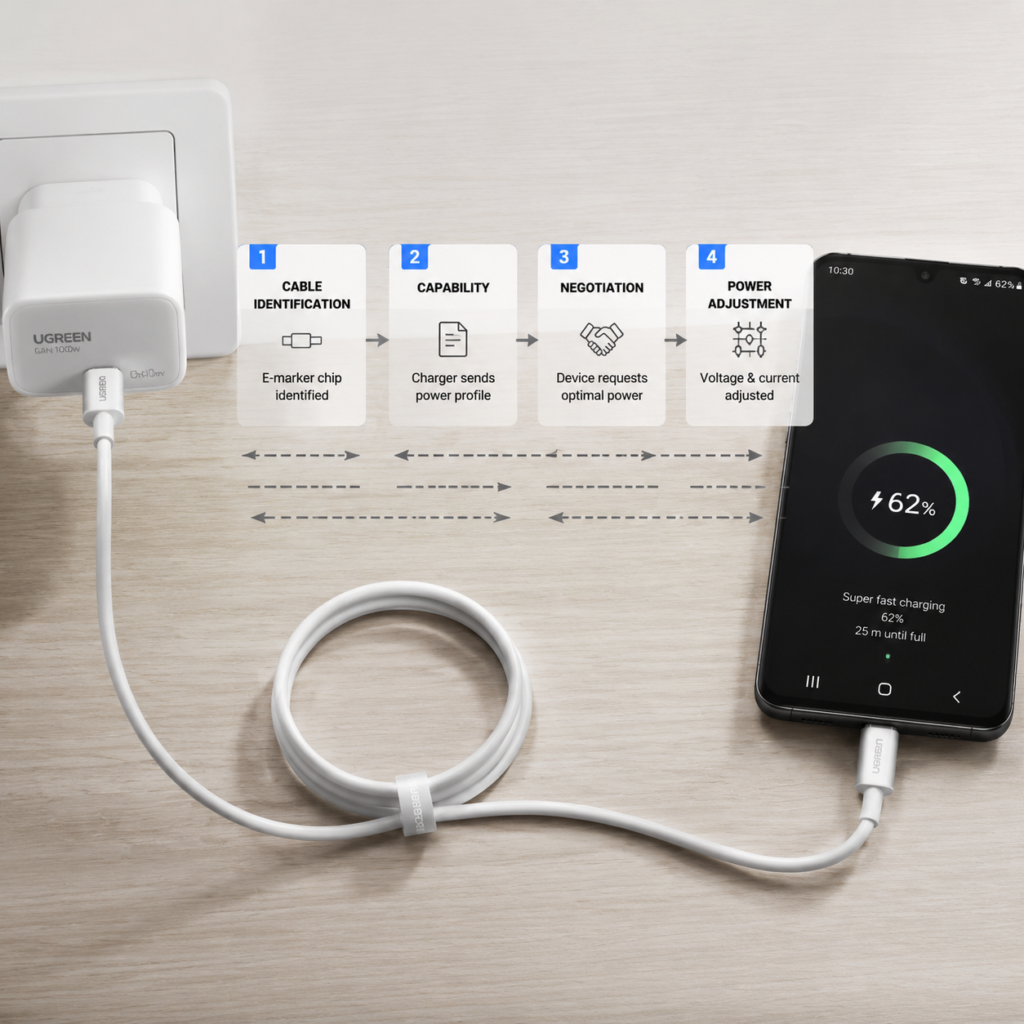
- Cable Insertion Identification: When the cable is plugged in, the dedicated negotiation contact (CC pin) in the interface will automatically complete connection detection, confirm the insertion direction, and perform initial role and current notification. For cables with electronic marker chips, PD devices can also read their current, EPR and other capabilities through the cable discovery process; unmarked cables cannot provide these electronic marker information.
- Both Parties Report Capabilities: The power supply end reports all power levels it supports (technical name: PDO, Power Delivery Object), which is equivalent to the restaurant handing over the menu; the power receiving end feeds back the power range it can accept, which is equivalent to the customer saying what they can eat and what their budget is.
- Negotiation and Matching: The actual negotiated power shall not exceed the common capability of the entire link and current limits; the power receiving end usually requests a suitable PDO or APDO within the available range according to its own strategy, not necessarily the highest level.
- Dynamic Adjustment: During the charging process, if the battery is almost full, the temperature is too high, or the device suddenly becomes high-load (such as starting to play games), the device can adjust the power by reducing the actual power draw or reinitiating a PD request when needed; the specific mechanism depends on the device design.
Relationship Between Power, Voltage, and Current
Many people don’t understand the relationship between these three. In fact, just remember a simple formula:
Power (Watt, W) = Voltage (Volt, V) × Current (Ampere, A)
The higher the wattage, the faster the charging in theory, but only if the device supports such high power. For example, 9V×3A=27W, 20V×5A=100W, are common PD power levels.
Why do high-power fast charging need to increase the voltage? Because under the same power, the higher the voltage, the smaller the current, and the less heat generation and loss of the cable. For example, for the same 100W, if you use 5V, you need 20A current, the cable has to be very thick and will get very hot; if you use 20V, you only need 5A, the cable doesn’t need to be too thick, and the heat generation is much less — this is the core reason why PD fast charging uses high voltage.
Mainstream PD Versions and Power Level Rules
Core Comparison of In-Use Versions
At present, there are three main PD versions common on the market. We can quickly see the differences with a table:
| PD Version | Maximum Power | Core Features | Applicable Situation |
|---|---|---|---|
| PD 2.0 | 100W (SPR) | Basic and universal, only fixed voltage levels | The earliest popularized, almost all PD devices support it |
| PD 3.0 | 100W (SPR) | Added PPS optional function, more perfect negotiation efficiency and safety mechanism | Current mainstream version, PD devices in recent years basically support it |
| PD 3.1 | 240W (EPR) | Added EPR extended power range, supports higher voltage levels | Gradually popularized in high-end gaming laptops and workstations |
| PD 1.0 | – | Eliminated | No consumer-grade applications |
USB-IF has also released the PD 3.2 specification, and the specific functions and device support shall be subject to product specifications and the latest USB-IF specifications.
Version Compatibility and Capability Judgment
The basic compatibility logic of PD is very simple: higher versions are backward compatible with lower versions, and the lowest can fall back to 5V basic power supply. That is to say, even if the device only supports PD 2.0, it can charge normally with a PD 3.1 charger, but it cannot achieve the additional functions of higher versions; even if the device does not support PD, a regular PD charger will use 5V slow charging when plugged in, and will not burn the device.
Of course, there are exceptions: if the interface is damaged, the cable is non-compliant, the manufacturer has a design defect, or the device has a specific input mode, it may also be unable to charge, which cannot be generalized.
The actual negotiated power shall not exceed the commonly supported capabilities and current limits of all links in the entire link. The power receiving end will request appropriate power within the available range according to its own battery status, temperature, system load, required voltage and charging strategy, and may not always select the theoretical highest level. There are five core factors affecting capability: the level range of the power supply end, power range type (SPR/EPR), the current carrying capacity of the cable and E-Marker/EPR support, whether the port role matches, and the input capability and charging strategy of the power receiving end.
Two Types of Standard Power Levels
PD can use fixed PDOs, as well as adjustable power supply objects such as APDO; among them, PPS belongs to SPR APDO, and EPR of PD 3.1 also defines AVS APDO. They correspond to different usage scenarios:
Fixed Voltage Levels (PDO)
- SPR standard power range: four levels of 5V, 9V, 15V, 20V, with a maximum of 100W, which is the most popular at present.
- EPR extended power range: newly added in PD 3.1, three levels of 28V, 36V, 48V, corresponding to maximum 140W, 180W, 240W, mainly used for high-performance devices.
PPS Adjustable Levels (APDO)
PPS allows devices to request VBUS voltage and current in small steps within the specified range. Devices with appropriate charging architectures can thereby reduce some conversion losses and heat generation, but the battery is still charged by the internal charging management circuit of the device. Now many flagship mobile phones’ fast charging will utilize PPS capabilities.
Devices Corresponding to Common Power Levels
PD accessories of different powers are suitable for different devices, so there is no need to blindly pursue high power:
- 15W and below: Suitable for TWS earphones, smart watches, small power banks, PD 2.0 and above is sufficient.
- 25W-45W: Suitable for ordinary mobile phones and tablets. Flagship phones generally need to support PD 3.0 PPS to achieve full speed.
- 65W-100W: Commonly used for thin and light laptops and other devices; whether it can meet the maximum charging speed of the device should be checked against the PD version, PDO/APDO, cable current capability and manufacturer’s charging strategy required by the device. 100W fixed PDO capability is not unique to PD 3.0.
- 140W-240W: Suitable for gaming laptops, mobile workstations, and high-performance monitors. The entire link of charger, cable, and device must support PD 3.1 EPR to achieve this.
How to Calculate the Actual Achievable Charging Power
Many people buy high-power chargers but fail to meet expectations, because they have not calculated the capability of the entire link correctly. Here we teach you a four-step verification method, check it along the way to know the actual maximum power, the core logic is to find the short board of the entire link. Take a simple example: 100W charger + 60W cable + 25W mobile phone, the actual maximum is 25W, because the mobile phone is the shortest board.
Step 1: Verify the PD Output Capability of the Charger
First look at the parameters of the charger, turn to the nameplate on the back, or look at the Output column on the product detail page, focus on confirming three pieces of information: what are the fixed voltage levels, what is the adjustable range of PPS, and what is the maximum power of a single USB-C port.
Here we should pay special attention to the pitfalls of multi-port chargers:
- Don’t just look at the marketing words of “total power”, distinguish between single-port maximum power and total power — many dual-port chargers labeled “100W total power” only have a maximum of 65W for a single USB-C port.
- There are two types of power distribution: one is fixed distribution, where the single-port power is not affected by other ports, for example, two USB-C ports are both 65W when used alone, and both are 65W when used at the same time; the other is shared distribution, where multiple ports share the total power, for example, the total power is 100W, plugging in one port is 100W, plugging in two ports becomes 65W+30W, and the power will be renegotiated when plugging and unplugging devices.
- Some multi-port chargers have priority main ports, and when the devices are fully plugged in, the secondary ports will automatically downgrade.
- When purchasing, prioritize products with a clear “multi-port simultaneous output power distribution table”, don’t guess.
Step 2: Verify the PD Carrying Capacity of the Charging Cable
The cable is a short board that many people easily ignore. Cables of different specifications have very different power capacities:
- 3A cable: Supports up to 60W (20V×3A), does not require a built-in E-Marker chip.
- 5A SPR cable: Supports up to 100W (20V×5A), must have a built-in E-Marker chip — this chip is used to tell the power supply end “I can carry 5A”, without it, no matter how thick the cable is, the power supply end will only output 3A.
- EPR cable: Supports 140W-240W PD 3.1 fast charging, has a built-in higher specification E-Marker chip, and can support higher voltage and current.
The quick identification method is very simple: look at the markings on the cable body or packaging. Regular high-power cables usually clearly mark the current (such as 5A), power (such as 100W), or E-Marker/EPR words. Longer or higher resistance cables may increase voltage drop and temperature rise, but there is no unified 2-meter power derating boundary; cables with nominal current and power matching the purpose and meeting relevant USB-C requirements should be selected.
Step 3: Verify the PD Input Capability of the Device
The support upper limit of the device itself is the final determining factor. No matter how high the charger and cable are, it is useless if the device does not support it:
- Mobile phones and tablets: Go to the official parameter page to check the fast charging support list, confirm the maximum power of PD and the support range of PPS — for example, some mobile phones only support 3.3-11V PPS, it is useless to buy a charger that supports 3.3-21V.
- Laptops: Check if there is a PD charging mark next to the USB-C port, or check the USB-C PD input voltage, current or power specifications published by the manufacturer. The original adapter power can only be used as a reference, especially when it uses a non-USB-C interface.
- Special note: Some devices’ USB-C ports only support data or video, not PD charging — for example, the second USB-C port of some laptops is only a data port, and there is no response when plugged into a charger, so be sure to check clearly before buying.
- If using a docking station or adapter, confirm that it supports PD pass-through function. Docking stations may reserve power for themselves and peripherals, and conversion and cable losses will also vary with products and loads; you should check the PD input, PD pass-through and host available power marked on the docking station.
Step 4: Verify Dynamic Limiting Factors
Even if the entire link hardware supports high power, it cannot run at full speed all the time. There are several dynamic factors that limit power:
- Battery level: As the battery level increases, the device usually gradually reduces the charging power to protect battery life; but there is no unified percentage of the battery level when the power starts to decrease, which shall be subject to the device’s battery management and charging protection strategy.
- Temperature: If the device or ambient temperature is too high (such as in the sun in summer), to prevent overheating damage, the device will limit the charging power, and it will recover when the temperature drops.
- Device load: If the device is running under high load, such as playing games or editing videos, it consumes a lot of power itself, so the power allocated to charging is less, and the charging speed will slow down.
How to Choose Compliant PD Accessories
PD accessories on the market are mixed, many products labeled “PD fast charging” actually do not meet the specifications. When choosing, you should distinguish three different types of compliance requirements.
Differences Between Three Types of Compliance Requirements
Many people mix different certifications together, but they are completely different things:
- PD technical compliance: Refers to the product meeting the communication, negotiation, and cable identification requirements of the PD specification, which is the basis for cross-brand compatibility — in short, it really supports PD, not a fake label.
- USB-IF certification: It is a voluntary industry certification launched by USB-IF. Products need to pass strict compatibility tests. Products with certification generally have better compatibility, but it is voluntary, not mandatory, and USB-IF certification does not equal compliance with local mandatory regulations.
- Destination regulatory requirements: These are mandatory, and vary by region:
- European Union: Products must complete conformity assessment and affix the CE mark in accordance with applicable regulations, which may include low voltage, electromagnetic compatibility and RoHS, etc.
- United States: Shall comply with applicable FCC rules according to product attributes. Ordinary chargers do not necessarily require FCC Certification, and may specifically apply to SDoC or exemption rules.
- China: Requires CCC (3C) certification, and products in the mandatory catalog must obtain it before they can be sold.
In short, PD technical compliance is the basis for “being usable”, USB-IF certification is the guarantee for “being easy to use”, and local regulatory certification is the premise for “being legally sold/used”. The three cannot replace each other.
Quickly Identify Compliant Accessories
Without professional tools, you can start with markings and materials:
- Charger: The nameplate or parameter page may be marked with “USB PD” “PD PPS”, and list standard PD voltage levels (such as 5V/9V/15V/20V). However, relying solely on marketing labels, or whether the PDO parameters are fully printed, cannot determine whether the product meets the PD specification. Priority should be given to verifying the manufacturer’s technical specifications, USB-IF certification query results (if the manufacturer claims to be certified), and applicable legal markings and documents.
- Charging cable: High-power cables will clearly mark the corresponding current and power on the packaging or cable body, such as “5A”, “100W”, “EPR 240W”, etc. If it only marks “fast charging cable” without specific parameters, try not to buy it.
Purchase Logic for Different Scenarios
When purchasing, there is no need to blindly pursue high power. Use the four-step verification method mentioned above and choose according to your needs:
- For mobile phones: Prioritize matching the PD/PPS levels supported by the mobile phone. For example, if the mobile phone only supports 25W PPS, buying a 65W one is enough, no need to buy a 100W one, it’s a waste of money.
- For laptops: The single-port power should not be lower than the charging power recommended by the manufacturer, and match the cable of the corresponding specification — for example, a 90W laptop needs to buy at least a 90W PD charger and a 5A 100W cable.
- For multiple devices/travel: Focus on the power distribution table of multi-port simultaneous output, confirm whether it can meet your device needs at the same time; also confirm that the charger’s input voltage is wide-range (100-240V) to adapt to the local mains voltage of the destination.
- For 140W+ high power: Be sure to confirm that the entire link of charger, cable, and device supports PD 3.1 EPR. If any one is missing, it cannot reach 240W, and can only reach up to 100W.
Differences Between PD and Other Fast Charging Protocols
In addition to PD, there are many other fast charging protocols on the market, such as Qualcomm QC, and private fast charging of various mobile phone brands. What is their relationship with PD? Can they be compatible?
Three Types of Common Fast Charging Implementations
We can divide common fast charging into three categories:
- PD fixed levels: A universal standard developed by USB-IF, free and open, compatible across brands and ecosystems, and is currently the most popular universal fast charging standard.
- PD PPS: It is part of the PD standard, an optional function of PD 3.0, not an independent protocol. It allows devices to request VBUS voltage and current in small steps within the specified range; devices with appropriate charging architectures can thereby reduce some conversion losses and heat generation, but the battery is still charged by the internal charging management circuit of the device.
- Manufacturer or platform fast charging solutions: The compatibility ranges vary. QC was once adopted by many brands; other solutions may require specific protocol chargers, cables or certified accessories. Whether the maximum power can be achieved should be checked against the official compatibility specifications of the corresponding device.
To judge what fast charging a device supports, don’t look at the marketing name (such as “super fast charging”, “flash charging”), be sure to look at the fast charging support list on the official parameter page, subject to the official label.
Compatibility Rules of Different Protocols
The compatibility logic between different protocols is very simple, just remember these few:
- Devices and chargers that support private fast charging are mostly compatible with PD universal fast charging (except for very old devices).
- Using a PD charger to charge a private protocol device can only reach the PD level speed supported by both parties, and cannot reach the maximum power of the private protocol; the actual PD power shall be subject to the PD compatible levels and test conditions officially published by the model.
- Non-PD chargers cannot trigger high-voltage PDO/APDO of USB PD negotiation; devices usually fall back to 5V power supply capability supported by both parties or other common non-PD charging methods, and the actual power depends on the port and device implementation.
- Core conclusion: To achieve the maximum fast charging speed, the charger, cable, and device must all support the same protocol.
Applicable and Inapplicable Scenarios of PD
PD is not omnipotent, you can choose according to your needs in different scenarios:
- Situations where PD is preferred: Mixing devices of multiple brands (such as Apple mobile phones, Lenovo laptops, tablets), charging standard PD devices, pursuing accessory versatility — one PD charger can handle all devices, no need to bring several.
- Situations where PD is not suitable: Pursuing the peak fast charging speed of private protocols (such as charging a Huawei mobile phone at full 66W speed), old USB-C devices without PD function — in this case, buying a PD charger is useless, you still have to use the original private fast charging accessories.
Common Misconceptions and Troubleshooting
Advanced Misconception Correction
In addition to the basic misconceptions mentioned earlier, there are several advanced pitfalls that are easy to step into:
- Charging non-PD devices with PD will burn them: Wrong. Regular PD chargers will automatically identify the device, and if it does not support PD, it will drop to 5V basic power supply, which is exactly the same as ordinary USB chargers, completely safe.
- PD 3.1 must be faster than PD 3.0: Wrong. If it is a low-power scenario of 100W and below (such as a 25W mobile phone), there is no difference in experience between the two. The advantage of PD 3.1 is only in high-power scenarios above 100W.
- Fast charging will definitely damage the battery: Wrong. Compliant PD accessories and device battery management systems can charge safely within the design range, but the actual impact of fast charging on battery life still depends on temperature, charging rate, long-term usage methods and device strategies; avoiding long-term high-temperature charging is more important.
- PD 240W is already popular: Wrong. At present, only high-end gaming laptops, mobile workstations and corresponding accessories support 240W EPR. The vast majority of mobile phones and thin and light laptops still use PD of 100W and below, so there is no need to blindly pursue new ones.
Safety Boundaries and Stop-Use Signals
When regular PD products are used normally, slight heat generation is normal. The specific temperature rise should be judged in combination with the manual, ambient temperature, and load — for example, charging a gaming laptop in summer, it is normal for the charger to feel warm to the touch.
But if the following situations occur, stop using immediately to avoid danger:
- Too hot to hold
- Burnt smell
- Shell discoloration, bulging
- Plug oxidation, blackening
- Repeated unexplained disconnection, still the same after eliminating cable and interface problems
Three-Step Troubleshooting Method for Common Problems
If you encounter charging problems, don’t panic, use the four-step verification logic mentioned earlier, and troubleshoot in order:
Cannot Charge
- First check the physical connection: whether the interface is plugged in tightly, whether there is dust accumulation or oxidation in the USB-C port, clean it with a cotton swab and try again.
- Then use the four-step verification method to confirm that the entire link supports PD: for example, whether it is plugged into a USB-C port that only supports data, or whether the cable is completely non-compliant.
- Troubleshoot by replacement method: replace one by one with normal PD accessories to find out whether the problem is the charger, cable or device.
Slow Charging Speed
- First use the four-step verification method to find the power short board of the entire link: for example, whether the cable is only 3A, with a maximum of 60W, while the laptop needs 90W.
- Check whether multiple ports are charging at the same time, causing the single-port power to decrease.
- Eliminate dynamic limitations: whether the mobile phone battery is already very high, the ambient temperature is too high, or there are high-load programs running in the background of the device.
Frequent Disconnection/Reconnection
- You can first perform isolation testing by replacing a known good cable, but you cannot presuppose that E-Marker is a high-probability fault point; you should also check the interface, charger, docking station and device end at the same time.
- Check whether the interface is loose or has poor contact, such as interface wear caused by frequent plugging and unplugging.
- If it is a multi-port charger, a brief disconnection when plugging in a second device is a normal power switch, not a fault.
Power Verification Methods and Precautions
If you want to know the actual charging power, you can use a USB-C power meter to measure: connect the power meter in series between the charger and the charging cable, and you can read the output voltage, current, and power in real time.
But pay attention to two points:
- The power meter displays the power near the output end of the charger, while the values displayed by mobile phones and laptops may reflect the battery receiving power or other internal statistical calibers of the device. Docking stations may reserve power for themselves and peripherals, and cables and conversion links may also bring losses; the specific should be interpreted according to their respective measurement positions, and a fixed loss ratio cannot be applied.
- Don’t judge whether the accessory is compliant solely by the power displayed by the device, it should be combined with the capability of the entire link — for example, the mobile phone only supports 25W, you use a 100W charger, it is normal to display 25W, not that the charger is bad.
Summary and Frequently Asked Questions
What Problems Can You Solve After Learning These?
At this point, you have mastered the core knowledge of PD fast charging from entry to semi-proficiency, and can completely independently solve most PD-related problems:
- Can distinguish the differences between USB-C interface, PD protocol, and data/Thunderbolt functions, avoiding basic cognitive pitfalls.
- Can understand the parameters of accessories and devices, and use the four-step verification method to calculate the actual maximum charging power.
- Can identify compliant PD accessories, and distinguish the differences between PD technical compliance, USB-IF certification and local mandatory regulations.
- Can distinguish between PD universal fast charging and private fast charging, and choose the appropriate charging solution according to your own needs.
- Can troubleshoot common problems such as inability to charge, slow charging, and frequent disconnection by yourself.
Frequently Asked Questions
Does having a USB-C port definitely support PD fast charging?
Not necessarily. USB-C is a hardware interface, PD is a charging protocol, and the two are independent of each other. Some devices’ USB-C ports only support data or video transmission and do not have PD charging function, such as the USB-C port of some old docking stations, and the secondary USB-C port of some laptops.
What is the difference between PD 3.0 and PD 3.1?
The core difference is the different power upper limits: PD 3.0 supports up to 100W SPR standard power range, PD 3.1 adds EPR extended power range, up to 240W, and adds three high-voltage levels of 28V/36V/48V at the same time. PD 3.1 is backward compatible with all functions of PD 3.0, and in low-power scenarios of 100W and below, there is no difference in user experience between the two.
What is PPS? Do all PD 3.0 devices support it?
PPS is an optional programmable power supply function of PD 3.0, which can adjust the output voltage in very small steps, reduce some voltage conversion losses and heat generation during charging, and improve the direct charging efficiency of devices such as mobile phones with appropriate charging architectures. It is an optional function, not all PD 3.0 devices support it. Both the charger and the device must support PPS at the same time for it to take effect.
Is a cable with E-Marker required for 100W PD charging?
Yes. 100W PD corresponds to the 20V/5A specification. According to the PD specification, USB-C cables carrying 5A and above current must have a built-in E-Marker chip to report the current carrying capacity of the cable to the power supply end. Cables without E-Marker can only support up to 3A/60W PD charging.
Will charging a private protocol mobile phone with a PD charger damage the battery?
Compliant PD chargers will negotiate with the mobile phone the PD levels supported by both parties, and charge at the power acceptable to the device. The battery management system built into the mobile phone will also adjust the charging current and voltage in real time. The actual impact of fast charging on battery life is still related to temperature, charging rate, long-term usage methods and device strategies, and avoiding long-term high-temperature charging is more important. Just because it does not support the private protocol, it usually cannot reach the maximum speed of private fast charging.
What is the difference between the total power and single-port power of a multi-port PD charger?
Single-port power is the maximum power that a single interface can output when used alone, and total power is the sum of the maximum power of all interfaces when outputting at the same time. If it is a charger with shared power distribution, when multiple devices are used at the same time, the single-port power will be lower than the maximum value when used alone. The specific distribution method depends on the multi-port simultaneous output power table given by the manufacturer.
What conditions are required for 240W PD fast charging?
The entire link must support the PD 3.1 EPR specification: the charger must support the 48V/5A level of PD 3.1 EPR, the charging cable must be a 240W cable that meets the EPR specification, and the power receiving device itself must also support PD 3.1 EPR input. All three are indispensable.
Are USB-IF certification and 3C certification the same thing?
No. USB-IF certification is a voluntary industry certification launched by the USB Implementers Forum, which mainly verifies the compatibility of the product’s USB functions (including PD fast charging); 3C certification (CCC) is China’s mandatory safety certification, targeting the product’s safety performance such as safety regulations and electromagnetic compatibility. The two have different scopes of application and certification purposes, and need to be confirmed separately.
In general, USB PD is currently the most universal fast charging standard in the USB-C ecosystem. Its core value is to enable devices and accessories of different brands to match charging power safely and efficiently. Understanding the basic logic of PD, power calculation methods and compliance judgment skills, you can avoid the vast majority of purchase and use pitfalls, and no longer have to pay for various “fast charging” marketing rhetoric.