
Sellers of charging-related products on Amazon almost always encounter situations where they are required to submit certification documents — either their new listing is stuck in category review, or a well-performing listing is suddenly restricted from sale, or even FBA inbound shipments are blocked at the warehouse. Many new sellers panic when they face this for the first time: they can’t find the submission entry, don’t know what files to upload, and get rejected after multiple uploads, which eventually leads to the listing being taken down and lost sales.
This article starts from the most basic knowledge, covers pre-submission preparation, practical backend operation steps, exception handling after rejection, and finally introduces several advanced tips to help you avoid pitfalls. The whole article uses products such as chargers, USB-C cables, data cables, and power adapters as examples; sellers of other categories can also refer to the core logic.
1. First, Understand: When Will You Be Required to Submit Certification? How to Judge If It Is a Product Compliance Request?
Many sellers think that certification only needs to be submitted when new products are listed, but that’s not the case. Amazon’s compliance requests can appear at all stages of the entire product lifecycle:
The first is the new product listing stage. The most common is high-risk category access — for example, products involving electrical safety such as power adapters and USB-C fast charging cables are inherently high-risk categories on Amazon, and you may be required to submit compliance certificates before listing to start selling. In addition, when opening stores across sites, for example, if you expand from the US site to the European site, the platform will verify whether the product meets local regulatory requirements, which will also trigger a submission request.
The second is the in-sale stage. The platform conducts irregular random inspections, and if your product is selected, you will be required to submit documents. In addition, if a buyer complains about product safety issues, such as someone saying that the charger overheats or the data cable has broken insulation and leaks electricity, the platform will also launch an investigation and require you to provide compliance certificates.
The third is when information is changed. For example, if you modify the core information of a listing — such as product model, power, brand — or there is listing hijacking, it may trigger a secondary review.
The fourth is special fulfillment scenarios. For example, when you send FBA inbound shipments, the system prompts that there are inbound restrictions and requires compliance documents to be provided before warehousing. In this case, you must follow the requirements on the task page given by the system, and do not prepare based on experience.
So how do you confirm that you are really required to submit product compliance documents? You can find the basis from these places: official in-site notifications, compliance requests in Account Health, whether the ASIN is restricted from sale, and public compliance requirements for the corresponding category or site.
Special attention should be paid to the distinction here: what we are talking about today is **submission of safety and regulatory certificates for a single ASIN or a single product**, which is different from account reviews (such as identity verification, address verification) and brand appeals (such as infringement complaints). The quick judgment method is very simple: if the notification contains keywords such as “ASIN compliance”, “product safety”, or “category review”, it is the product compliance submission scenario we are talking about, and you can operate according to the method in this article.
2. What Are the Documents to Be Submitted? Don’t Mix Up the Types
Many new sellers get a headache as soon as they see that certification needs to be submitted — now it’s a test report, now it’s a DoC, and there’s something called UL Listing, they can’t tell them apart at all. Let’s first explain a few core terms in plain language:
The first is **test report**, which is a result record formed after testing samples according to specific methods or standards. Whether the report must be issued by an independent third-party laboratory, and what qualifications the laboratory should have, shall be subject to applicable regulations and the requirements of Amazon’s task page. For example, for a 65W USB-C charger, the test will focus on its insulation performance, lightning resistance, stability at high temperatures, etc. according to the corresponding safety standards. The report will clearly state the product model, parameters, test results, and the standards based on which the test was conducted.
The second is **Declaration of Conformity, abbreviated as DoC (Declaration of Conformity)** in English. This is not issued by a laboratory, but a commitment document issued by the responsible entity (such as the brand owner, manufacturer), declaring that the product complies with all relevant regulations of the target market, which is equivalent to the product’s “compliance commitment letter”.
The third is **third-party certification/listing document**, which is a certification record issued or verifiable by a certification body after evaluating the product according to a specific certification scheme. For example, UL Listed is a product certification/listing scheme of UL Solutions; whether it can be used for a certain review shall be subject to the certification type, standard, model range and verifiable status required by the task page.
Here, remember a general rule: different types of documents cannot replace each other. For example, a test report cannot replace a DoC, and vice versa. You must submit the corresponding documents according to the platform’s requirements.
What Are the Common Document Types?
First are the required categories, that is, those clearly marked as Required on the task page:
The first category is safety documents, such as test reports or declarations of conformity. Which one is specifically required depends on the task page requirements.
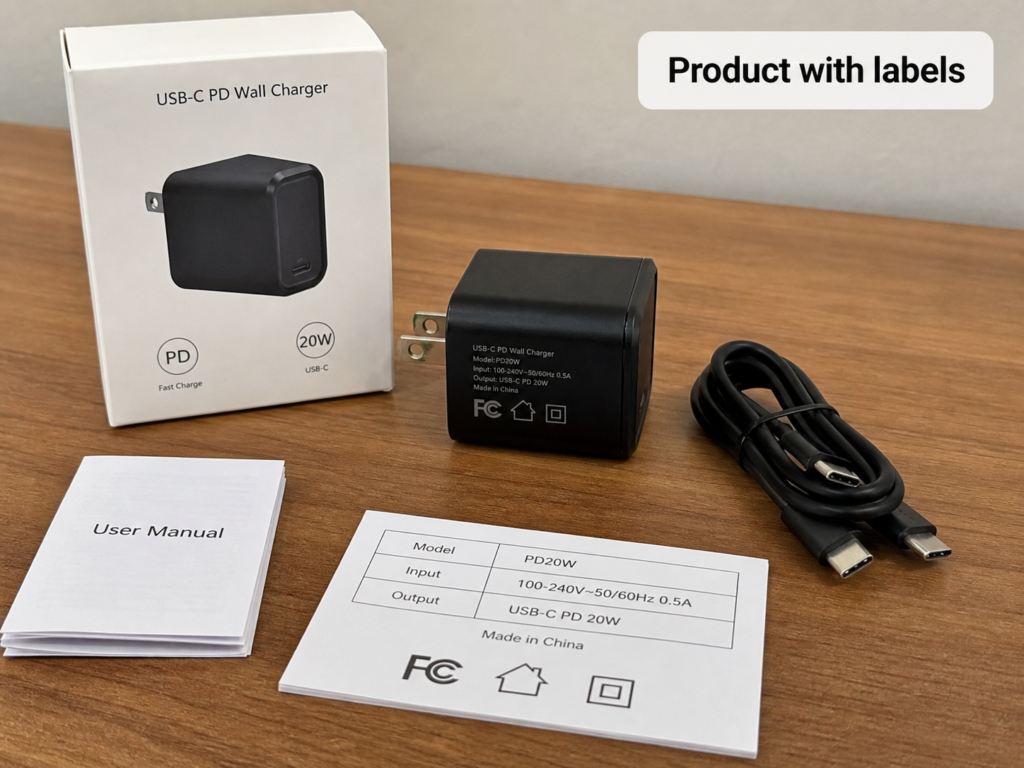
The second category is physical proof documents, such as real photos of products with parameter labels, packaging pictures, and manuals. Note here that the labels on the product must be photographed clearly. For example, the model, input and output parameters, and brand on the charger must not be so blurry that the text cannot be read.
The third category is association proof documents, such as factory authorization letters, and proof of the relationship between the brand and the manufacturer. This is not required in all cases, only in special scenarios. For example, if you use the factory’s certification instead of your own brand’s, you may need the factory to issue an authorization to prove that you have the right to use this report.
Then there are documents that only need to be submitted in specific scenarios, not for all products:
For example, documents related to EMC (Electromagnetic Compatibility), energy efficiency, and hazardous substances, such as EU RoHS and US Energy Star, are only required for specific products on some sites.
Another example is USB-IF related materials, which should only be submitted when explicitly requested by Amazon’s task page. If you use the USB-IF certification mark or trademarks subject to its licensing conditions, you must also comply with USB-IF’s testing, listing and trademark licensing requirements; page claims such as PD or high-speed data should have verifiable technical evidence matching the claims, but this does not necessarily mean that USB-IF certification materials must be submitted.
There are also documents related to batteries and wireless functions. If the product has wireless communication functions such as Bluetooth, Wi-Fi, cellular communication, etc., you should check the radio-related requirements according to the sales site and task page. Pure wireless charging function should not be uniformly required to have RF certification as a wireless communication product just because of inductive power transmission; its safety, EMC, energy efficiency and battery materials should be confirmed separately according to product functions, applicable regulations and task pages.
What Fields Are Mainly Checked in the Review of Charging Products?
Many people think that having a report is enough, but in fact, what reviewers value most is whether the information on the report matches your product and listing. Which specific fields to check is not uniform, but is jointly determined by the site, the product’s interface/rated capacity, sales form, page claims, and task page requirements.
Let’s talk about different products separately:
For ordinary chargers and power adapters, the main checks are brand, model, manufacturer, rated input and output, power, and plug specifications.
For ordinary USB/USB-C cables, the main checks are brand, model, manufacturer, interface type, wire gauge, and rated current/voltage.
For PD fast charging cables and high-speed data cables with E-Marker chips, in addition to the ordinary cable fields above, you also need to additionally check the E-Marker parameters, supported fast charging power, and data transmission rate.
If it is a set of charger plus cable, there must be compliance documents covering both the charger and the cable at the same time, not just one of them.
If the product has wireless communication functions such as Bluetooth, Wi-Fi, cellular communication, etc., you should check the radio-related requirements according to the sales site and task page. Pure wireless charging function should not be uniformly required to have RF certification as a wireless communication product just because of inductive power transmission; its safety, EMC, energy efficiency and battery materials should be confirmed separately according to product functions, applicable regulations and task pages.
Several Most Frequently Asked Questions by New Sellers
Here, let’s first clarify the most frequently asked questions uniformly:
Question 1: Do I have to pay Amazon to submit certification documents?
The answer is: the platform itself does not charge any submission fees, but if you need to find a third-party laboratory to do testing and issue a report, this fee is what you have to pay to the laboratory yourself.
Question 2: Can the charging cable and charger use the same certification report?
This is not certain, it depends on the coverage of the report, site requirements and the instructions on the task page. If it is a set product, the laboratory conducts a complete set of tests on the charger and cable together, and the report clearly covers both products, then it can be used; but if it is a separate charger test report, it definitely cannot be used on the cable, and vice versa.
Question 3: Can the same document be used for multiple stores and multiple ASINs?
Several conditions must be met at the same time: first, the models covered in the report must include all product models corresponding to the ASINs; second, there must be a legal association between the subject of the report and each store and brand, for example, you are the brand owner and have issued authorizations to multiple stores; third, the task page allows multiple ASINs to share documents; finally, it must also meet the requirements of the corresponding site. None of the four conditions can be missing.
Question 4: Can I modify or withdraw already submitted documents during the review?
In most cases, no. You have to wait for the review result to come out, then make corrections based on the result. The specific situation depends on the prompts on the page. Do not upload repeatedly casually, as it will interfere with the review.
6 Most Common Cognitive Misconceptions
Don’t wait until you fall into the pit to regret it. Many new sellers have made these mistakes:
Misconception 1: If I have a certification certificate, I will definitely pass the review. Wrong. Having a certificate is only the foundation. It also depends on whether the type of certificate is correct, and whether the information on it matches your product and listing. For example, if the model on the certificate is A and you are selling B, you definitely won’t pass.
Misconception 2: I am an individual seller, so I don’t need to submit compliance documents. Wrong. Whether you are an individual seller or a professional seller, as long as you sell products on the corresponding site, you must comply with local regulatory requirements, which has nothing to do with your seller type.
Misconception 3: Certification requirements for different sites are universal. If I have US certification, I can sell on the European site. Completely wrong. The regulations of each country and region are different. For example, the US commonly uses UL-related safety standards, the EU uses a series of standards under the CE framework, and Japan uses PSE. They are not interchangeable. Never use the certification of one site for another site.
Misconception 4: If I change the model on the report to my own, I can muddle through. Never do this. Amazon has a special verification mechanism. Once it is found that the document has been tampered with, the lightest consequence is rejection, and the heaviest is direct store closure, which is not worth the loss.
Misconception 5: The more documents you submit, the easier it is to pass the review. Wrong. Reviewers only look at the materials required on the task page. If you submit a bunch of irrelevant documents, it will instead make it hard for reviewers to find the key points, and may even lead to direct rejection due to messy materials. Just submit the required content.
Misconception 6: If I have a CE certificate, I meet the EU compliance requirements. This is the pit that many new sellers doing the European site are most likely to fall into — CE is not a unified certificate at all. The core of EU compliance is **EU DoC (EU Declaration of Conformity) plus complete technical documents**. The so-called “CE certificate” is often just a test report issued by a laboratory, which cannot be directly used as a compliance certificate. You must pay attention to this.
3. Do These Preparations Before Submission, You Can Reduce Rejection by 80%
Many people’s submissions are rejected not because they don’t have certification, but because the preparation work is not done well and the information does not match. Be sure to do these things before submission:
First Lock in 4 Core Elements, Don’t Prepare Blindly
The first is **site**. The regulations of different countries and regions are completely different. For example, the documents required by the US site and the German site are very different. First figure out which site’s requirements it is.
The second is **ASIN/variant range**. Is it a single ASIN, or all child ASINs under a parent? Don’t only prepare for the main ASIN and fail to cover the child ASINs.
The third is **product form**. Is it a separate charger, a separate cable, or a set? Does it have a battery or wireless charging function? Different forms require different documents.
The fourth is **the specific document type required by the task**. Be sure to look at the Required Documents list on the task page, and prepare whatever is required.
Remember a general principle: all requirements are subject to the task page. Never guess based on experience. For example, last time you submitted a UL test report for the US site, but this time the task page may also require an energy efficiency report. Acting based on old experience is easy to fail.
3 Methods to Confirm Submission Requirements
Sorted by accuracy:
The first, and also the most accurate, is to directly look at the “required documents” list in the review notification or task page, distinguish which are required and which are optional, and don’t submit blindly.
The second is self-service query. Use the “Compliance Reference” tool in Amazon’s backend, select the corresponding site and product type, and you can see the general compliance requirements, which is suitable for advance prediction.
The third is manual confirmation. Open a case to find product compliance customer service, provide your ASIN and product type, and ask clearly what specific documents are required.
Note here: never apply the requirements of other categories or other sites. For example, your experience in selling phone cases is completely useless for chargers.
Core Pitfall Avoidance: Five-Item Consistency Check
Many people are rejected because of inconsistent information. What are the five items? They are **task requirements, physical product, label/packaging, listing page, and compliance documents**. The core information in these five places must match, not conflict.
They don’t have to be exactly the same word for word. You only need to check the core verifiable fields: brand, model/series, manufacturer/responsible entity, rated parameters, and function range. For example, if the brand has different capitalization, or the model has an extra color suffix, such small expression differences are allowed, but you need to provide verifiable association proof, such as a model comparison table or brand authorization letter, to prove that the two models are actually products of the same series.
If it is a product with multiple child variants, the core parameters of all child variants must be consistent with the documents and the physical product. For example, if you have 5 charger child variants with different powers, the report must cover all of them, not just one of them.
Certification Document Self-Check List
Check it yourself before submitting to save waiting in vain:
First are the basic mandatory items, which must be checked no matter what the situation is:
1. Core fields match the consistency requirements, and there must be traceability proof for differences. For example, if models are different, there must be a comparison table.
2. The test or certification covers the finished product, not only parts. For example, you can’t take a test report of a power chip as the compliance document of the entire charger, it will definitely be rejected.
3. The document has no missing pages, blurriness, or splicing, and is clearly readable. Many people’s photographed reports are so blurry that even the model can’t be seen clearly, and they are directly rejected.
4. If multiple models share one report, all involved models must be within the coverage of the report. For example, if 10 models are listed in the report, the 11th model you sell is not acceptable.
Then are conditional check items, which only need to be checked when explicitly required by the task page:
1. Validity period: For example, some sites require the test report to be issued within 1 year, and those beyond the validity period are not acceptable.
2. Laboratory qualification: For example, it is required that the report be issued by a laboratory with ISO/IEC 17025 qualification. Note here that Amazon does not have a unified list of accredited bodies, as long as it meets the qualifications specified on the task page.
3. Format requirements: For example, PDF format is required, a single file does not exceed a certain number of MB, and whether there are naming rules. Follow the requirements.
4. If applicable regulations or task pages require instructions, warnings or safety information, they shall be in a language prescribed by the target sales country and easily understandable by consumers; whether manuals must be provided and which label information must be translated shall be confirmed according to specific product regulations and site tasks.
Preparation Standards for Compliance Document Packages
Remember a principle: only upload the content required by the task page, don’t upload irrelevant content.
The minimum set of submissions generally includes the following categories, selected according to task page requirements:
1. Core compliance documents: such as test reports, DoCs, third-party certification/listing documents. Upload whatever is required, not all of them.
2. Physical proof documents: such as real product photos, packaging pictures, manuals. Upload as required.
3. Conditional association documents: such as entity authorization proof, model comparison table, USB-IF proof, battery/wireless supplementary documents. Only upload when needed.
When preparing documents, there are several red lines that must never be touched:
1. Never tamper with the content or conclusions of reports and certificates. For example, increasing the power on the report or changing the model to your own is fraud, and the consequences are very serious.
2. Do not splice, delete pages, alter or cover the content of test reports. Only when explicitly permitted by the task page, submission system or issuing body, shall sensitive information be processed according to their rules; if desensitization is required, you should first confirm with Amazon or the testing institution and retain the complete verifiable original.
3. Do not use reports with mismatched models, or marketing certificates such as “famous and high-quality products” to replace compliance documents. They are useless.
4. Do not modify the product labels and parameters by yourself to match existing documents. For example, if your product is actually 20W, changing it to 65W to match the report is also fraud.
If you are requesting documents from the factory, remember to ask for all of them:
Must-request: complete test report for the target site, DoC, model coverage comparison table.
Supplementary request: real photos of product labels/packaging, manuals, factory authorization letter (if you want to use the factory’s certification).
After getting them, be sure to check: whether the version of the document is consistent with the product you are currently going to sell, and whether it covers all the models and parameters you want to sell. Don’t use an old report as soon as you get it.
4. Practical Backend Submission Steps, Follow Them and You Won’t Go Wrong
After the documents are prepared, it’s time to submit them in the backend. Many people can’t find the entry, or upload to the wrong place, which wastes time. Let’s first talk about the most recommended submission entry.
Preferred Entry: Submit via Task/Notification Page
This is the most accurate, and you won’t upload wrong. The general path is: 「Performance」 at the top of the backend → 「Account Health」 → 「Product Compliance Requests」, and you can see all pending compliance tasks.
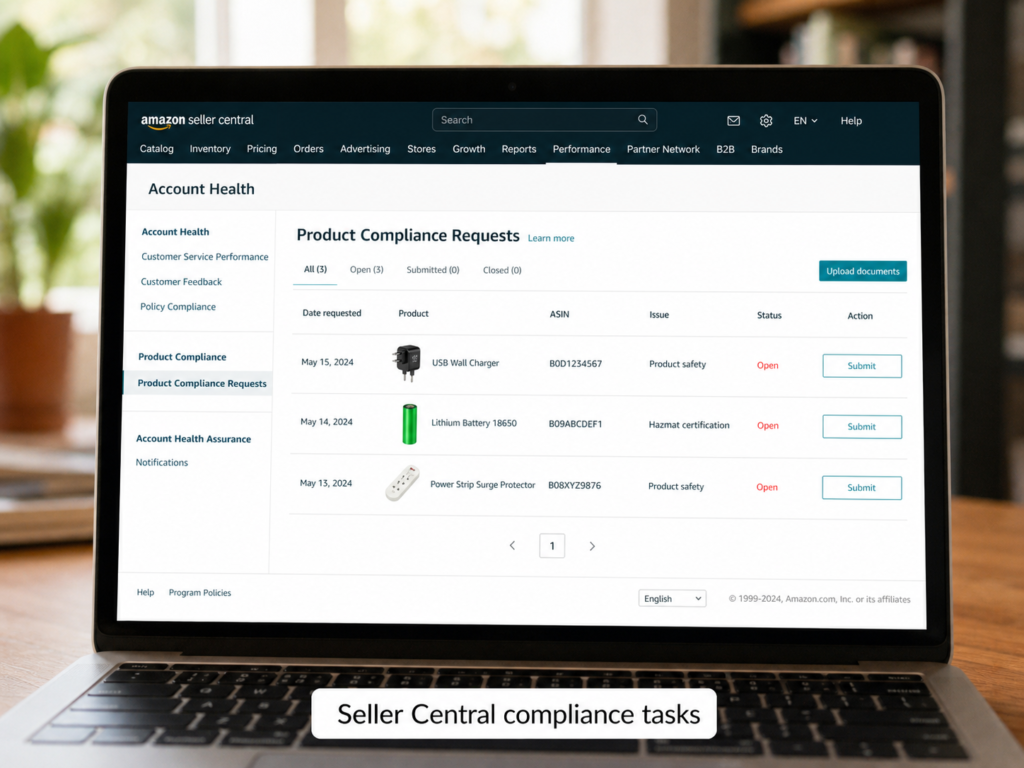
After entering, first select the correct operation type:
If it is a situation that you can correct by yourself, such as missing documents, mismatch, or information that needs to be corrected, select 「Submit Documents」;
If it is a situation of ASIN classification error, inapplicable requirements, or system misjudgment, for example, you sell ordinary USB-C cables but the system requires certification according to wireless chargers, select 「Appeal」.
Special attention should be paid here: on the current task page, select the “Provide Documents” or “Appeal” area that matches the actual situation. If you have entered a mismatched area, first check whether the page allows returning or changing; the interfaces of different sites and tasks may be different, subject to the page prompts.
The operation is very simple: find the corresponding task, click the button to enter the submission page. The advantage of this entry is that it is directly bound to the corresponding ASIN and review task, so you won’t upload the wrong product.
New Product Pre-Submission Entry (Only Supported by Some Sites/Products)
Applicable scenario: you have not received a review notification, and want to actively submit a pre-review before the new product is listed, to avoid being stuck after listing.
Reference path: backend 「Inventory」 → 「Manage All Inventory」 → find the corresponding product and click 「Edit」 → find the 「Compliance」 tab to upload.
Important tip: if you can’t find this entry, it means your site or product does not support active submission; in addition, if a review task has been triggered, you must submit from the task entry, and uploads from here are not counted.
Single ASIN Submission Steps
Follow the steps step by step, it’s not easy to make mistakes:
Step 1: First check whether the ASIN, SKU, and variant range displayed on the page are correct. Don’t work for a long time and upload the wrong product.
Step 2: According to the options on the task page, select the corresponding certification/document type. Don’t choose wrong. For example, if what is required is a UL test report and you select DoC, you will definitely be rejected.
Step 3: Fill in the required information such as certificate number, issuing body, validity period, and manufacturer truthfully. Don’t write “see attachment” for convenience. Reviewers will not look for them one by one in the attachments.
Step 4: Upload the documents according to the corresponding fields. It is recommended to name the file as 「Brand + Model + Document Type」, for example, “Anker A2633 UL Test Report”, to facilitate quick identification by reviewers.
Step 5: Check everything again before submitting. After the submission is successful, be sure to save the screenshot of successful submission and the task number, which will be used later when checking progress or opening a case.
Multi-ASIN Batch Submission (Use Only When Supported by the Task Page)
If there are multiple ASINs to submit, can you upload them in batches? It can only be used when the task page explicitly provides a batch submission entry or template. Don’t find a template by yourself casually.
Two prerequisites must be met at the same time for batch submission:
First, the product models, parameters, and core configurations of all ASINs are within the coverage of the same document;
Second, the task page does have a batch submission entry or template.
Preparation before submission: first make a mapping table of 「ASIN-SKU-Model-Report Coverage」 to ensure that each ASIN can correspond one-to-one with the model in the report, and avoid mismatch.
When operating, fill in the SKU, certification information, and variant range according to the template requirements, then upload.
After uploading, be sure to go to the batch upload status page to check if there are any errors. If it is an error of a single ASIN, just retransmit the corresponding part after correction, no need to retransmit all.
If there is no batch submission option, just submit one by one honestly. Don’t use other irrelevant templates, which will cause problems instead.
Troubleshooting Methods for When You Can’t Find the Submission Entry
Follow these steps to troubleshoot, most problems can be solved:
First, check whether you are logged into the seller platform of the corresponding site. For example, if you received a notification from the US site but logged into the backend of the European site, you definitely won’t find it; in addition, the entry of Vendor Central is different from the seller platform, don’t mix them up.
Then troubleshoot: has the notification expired? Have you deleted the corresponding ASIN? Has the task been processed by other account administrators?
If you still can’t find it, save the notification screenshot and task number, and open a case to consult product compliance customer service.
5. How to Follow Up After Submission? What to Do If Rejected?
After submission, it’s not all smooth sailing. You also need to follow up on the status and handle problems in time.
How to Check the Review Status?
There are three paths:
The first, and most direct, is the original review task/notification page, where the status is updated in real time.
The second is to go to the 「Account Health」 → 「Product Compliance Requests」 section, where you can see the status of all compliance tasks.
The third is, if your backend has a 「Manage Your Compliance」 section, you can also filter the corresponding ASINs in it to view.
Interpretation and Response to Common Statuses
1. **Pending Submission**: It means it is still within the deadline and you haven’t uploaded yet. Hurry up and complete it before the deadline, don’t be late.
2. **Under Review**: At this time, if there is no prompt for supplementary documents, do not upload files repeatedly, as it will interfere with the review; if a supplementary document entry appears, the review requirements are updated, or the original submission is returned, then resubmit according to the requirements.
3. **Approved**: Don’t just be happy. Confirm that the listing has been restored to sellable status, and all associated child variants have had their sales restrictions lifted. Don’t let the main ASIN be fine but the child variants still be restricted.
4. **Supplementary Required**: Only submit the supplementary materials explicitly required by the backend, don’t upload more irrelevant documents.
5. **Rejected**: First read the rejection notice carefully, figure out why it was rejected, then make targeted adjustments. Don’t just re-upload the original documents directly, it will definitely be rejected again.
Review Timeframe and Deadline
Two points to note:
First, the submission deadline is subject to the notification. Be sure to submit in advance, don’t wait until the last day. In case of problems, you still have time to modify. If you are overdue, the listing may be directly taken down.
Second, there is no unified commitment for the review timeframe. It is affected by the site, product type, and peak review seasons (such as before Black Friday and Cyber Monday). It can be as fast as a few days or as slow as several weeks. If the status has not been updated for a long time, open a case with the task number, ASIN, submission screenshot, and submission time for consultation.
Check Items After Review Approval
1. Confirm whether the compliance sales restrictions of the corresponding ASIN and variants have been lifted; if search display or advertising is still abnormal, you should check other reasons such as inventory, product information, advertising policies, account status, and advertising campaign settings respectively.
2. Check that all child variants have had their sales restrictions lifted, don’t miss any.
3. Back up all documents submitted this time. If they can be reused for other sites or other ASINs later, it will save you from looking for them again.
What to Do If the Review Is Rejected?
First figure out the common reasons for rejection, most of them fall into these categories:
1. Problems with the document itself: such as missing pages, blurriness, only parts tested, or document type not meeting requirements.
2. Information mismatch: for example, core fields such as model, manufacturer, power, and interface do not match, and there is no mapping proof.
3. Insufficient coverage: the report does not cover all submitted models, variants, and parameters.
4. Authorization/association issues: the subject of the report is inconsistent with your brand and seller entity, and there is no authorization or association proof.
5. Page claims exceed standards: for example, your listing says 100W fast charging, but the report only has 65W, which exceeds the coverage.
6. Operation errors: such as uploading the wrong ASIN, uploading the wrong field, or the document not meeting format requirements.
Different rejection reasons have different handling methods. You can handle them according to the following table:
| Common Rejection Reason | Handling Method | Submission Path |
| Missing corresponding test report/declaration | Supplement compliance documents for the corresponding site and product | Resubmit via the original task entry |
| Report does not cover model/parameters | Supplement difference explanation for minor differences; re-test for major differences | Resubmit via the original task entry |
| Five-item information inconsistency | Modify listing parameters / replace matching documents / supplement mapping proof | Resubmit via the original task entry |
| Unclear relationship between brand/manufacturer | Supplement entity association proof and authorization letter | Resubmit via the original task entry |
| Page claims exceed the scope of documents | Modify listing claims / supplement corresponding test reports | Resubmit via the original task entry |
| ASIN classification error | Prepare real product photos, function descriptions, and classification basis | Follow the appeal path |
Special attention should be paid here that some major changes cannot be solved only by difference explanations. The compliance coverage must be re-evaluated, and re-testing must be done when necessary:
For example, for chargers: change in rated input/output/power, change in circuit scheme, replacement of plug, replacement of core safety components (such as transformers, capacitors).
For example, for cables: change in wire gauge, increase in rated current/voltage, change in interface structure, addition of E-Marker chip, function upgrade (such as changing from ordinary charging cable to high-speed data cable).
And general ones: addition of wireless charging/built-in battery function, change of brand/manufacturer entity.
Don’t take a chance and think you can pass by just submitting a difference explanation in these cases. There is a high probability of rejection, and it wastes time.
Resubmission vs Appeal, How to Choose?
Many people can’t tell when to resubmit and when to appeal. Here is a judgment standard for everyone:
If it is a problem that you can correct by yourself, such as missing/wrong documents, parameter mismatch, or wrong page information, prioritize resubmission;
If it is a situation that is not your fault, such as ASIN classification error, inapplicable requirements, or system misjudgment, then choose to appeal.
When appealing, note: you must focus on “why this requirement is not applicable”, and provide verifiable evidence, such as product teardown pictures and function descriptions. Don’t say things like “how much I sold this product, how much money I lost”, or verbal promises like “I will change it later”. These are useless. Reviewers only look at evidence.
Other Common Exception Troubleshooting
1. **Submission entry disappears**: First check the ASIN, site, and account permissions to see if the task has expired, or has been processed by other administrators. If everything is fine, save the screenshot and open a case to find customer service.
2. **File can’t be uploaded**: First check whether the browser and network are normal, then check whether the format and size of the file meet the requirements, and whether it is encrypted. Try again with a clear file. Remember to save the error screenshot for easy contact with customer service.
3. **Listing is taken down**: First confirm whether it is caused by compliance issues. If yes, quickly supplement the required materials, and wait for recovery after the review is passed. Don’t delete the ASIN directly. The review record will still exist after deletion, which may affect other products.
4. **Misjudged and required to provide certification**: For example, you sell ordinary passive cables, but the system requires you to submit battery certification. In this case, prepare product function descriptions plus real photos, and submit them through the appeal path.
The Correct Way to Open a Case for Consultation
How to say it to solve the problem the fastest? Remember these points:
First, provide complete information: site, ASIN/SKU, task number, problem screenshot, type and status of submitted documents. Don’t make customer service guess.
Then the appeal must be clear, such as “Please help me restore the submission entry”, “Please explain the specific reason for rejection”, “Please help confirm the review progress”. Don’t say a bunch of useless things.
Also pay attention to several pitfalls: don’t open the same case repeatedly, it will be downgraded in priority; don’t upload a lot of irrelevant attachments, customer service won’t read them; don’t ask customer service to guarantee approval, customer service doesn’t have that power.
6. Advanced Compliance Tips: Methods to Avoid Pitfalls and Save Time
The previous parts are all about how to solve problems when you encounter them. Next, let’s talk about several advanced tips to help you avoid problems in advance and take fewer detours.
Do Compliance Prediction Before Procurement
Don’t wait until the goods are shipped to find out that there is no certification, then you will be in a passive position.
The core logic is: triple match according to 「target site regulations + product form + page claims」. There is no globally universal certification, don’t think that one report can be used everywhere.
The tool for quick prediction is the 「Compliance Reference」 tool in the backend. Select the corresponding site and product category, and you can see the general requirements.
When predicting, note: confirm the compliance standards corresponding to the core parameters, and ask the factory for the complete document package in advance. Don’t wait until the goods are sent to FBA to find out that certification is missing.
Also a reminder: the certification standards for different products on the same site are different. For example, the standards for chargers and USB-C cables are different, don’t mix them.
Time-Saving Tips for Multi-Model/Variant Submission
If your product has many models and many variants, can you share one certification? Three conditions must be met at the same time:
1. They are products of the same series, with the same core safety configuration. For example, only the shell color and packaging are different, and the internal circuit and parameters are the same.
2. The model list of the report clearly covers all the models you want to submit.
3. The laboratory or responsible entity has written confirmation that these differences do not affect compliance.
If you need to write a difference explanation, remember to list the specific difference points, attach a model comparison table, and clearly mark the corresponding coverage page numbers in the report to facilitate reviewers’ checking.
Pitfall avoidance tip: first confirm that the task page allows multi-model sharing. Before batch submission, be sure to check the mapping table, and don’t add irrelevant models.
Daily Compliance Document Management Methods
You don’t have to look for them temporarily every time. Develop the habit of organizing:
It is recommended to create files by model, organize the test reports, DoCs, label pictures, and packaging pictures of each model, and clearly record the corresponding ASINs, sites, and validity periods. You can find them directly when you need them later.
If there are changes, such as changing the factory, changing core components, changing power, changing the brand, or adding functions, be sure to re-verify the applicability of the certification. For example, if the rated current of the cable is increased from 3A to 5A, it is usually necessary to re-verify whether the report, certificate and model coverage documents clearly cover the 5A configuration and actual structure; if not covered or cannot be proven to be covered, supplementary testing or re-certification should be carried out according to the task page and applicable standards.
Establish expiration warnings for certificates/reports with clear expiration dates, renewal requirements or platform time limit requirements; for test reports, DoCs and technical documents without fixed validity periods, review them when there are changes in product design, key components, responsible entities, applicable regulations or page claims, and update them according to task page requirements.
Core Habits to Avoid Repeated Rejections
1. Before submission, be sure to go through the task requirements + self-check list. Only upload the required materials, don’t upload more.
2. For uncertain requirements, open a case in advance to consult customer service. Don’t guess based on experience, after all, Amazon’s rules change frequently.
3. Keep all original certification documents well, and never modify the content by yourself.
4. Confirm the compliance requirements in advance before the new product is listed. Don’t wait until the deadline to supplement materials. If you can’t make it, it will affect the listing.
Overall, submitting Amazon compliance documents looks complicated, but in fact, as long as you understand the rules, prepare according to requirements, and do a good job of checking, it is not that difficult. From the initial judgment of the type of compliance request, to locking in requirements, preparing documents, submitting in the backend, and then to subsequent exception handling and daily management, doing every step solidly can not only pass the review quickly, but also avoid many unnecessary losses. After all, for sellers of charging products, compliance is the foundation of long-term operation. Preparing well in advance is much better than being anxious only after the listing is taken down.